notes
SecureNote(tm) is a highly sophisticated software solution for storing notes. The encryption should be uncrackable. If it helps at all, the password for the instructions is 'password123'. I bet you can't read the flag note...
This challenge contains two binaries. note_writer takes a note file path as its argument, prompts for a password and a message, then writes an encrypted note to disk. note_viewer takes the same note file path, prompts for the password, and prints the decrypted message if the password is correct.
The goal is to decrypt the encrypted message inside flag.note. My approach would be understanding the encryption logic to see where i can reverse logic.
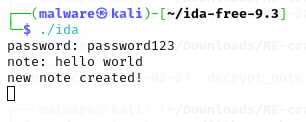
Running note_writer confirms the interface: it asks for a password and a note message, then confirms the note was created. The note on disk is unreadable gibberish when opened in a text editor.
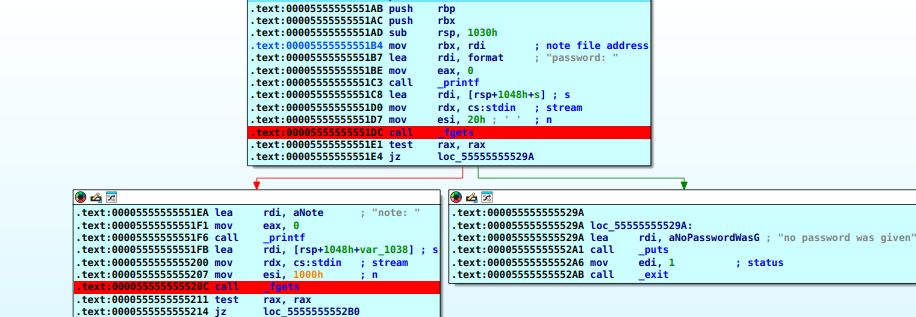
The writer starts by loading the note file address into rbx and printing a password: prompt via printf. It then calls fgets twice - once to read the password from terminal into a buffer on the stack, and once to read the note message. If either read fails (rax is zero after fgets), execution jumps to an exit path.
The Hashing Algorithm - Adler-32
Looking at the math in the assembly had me so lost and it was frying my brain. So let us have a proper break-down of what this algo is all about and how it works simply.
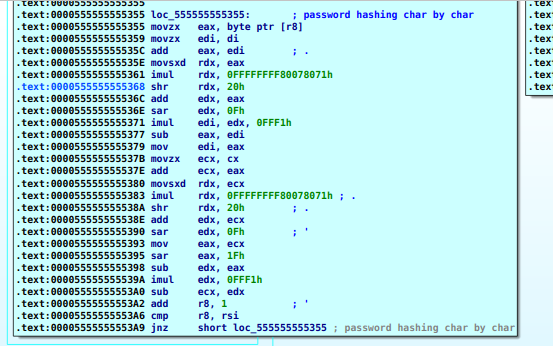
The hashing function is an Adler-32 implementation. Before diving into the assembly, here is what the algorithm actually does in plain English.
Imagine you have two buckets, Bucket A and Bucket B, both starting empty (A = 1, B = 0). You then feed your password into them, one character at a time. A starts at 1 to avoid weak hashes and is the defualt of the algo.
The rule for every character:
- Take the character's ASCII number and pour it into Bucket A. Bucket A now holds the new total.
- Take whatever Bucket A just became and pour that into Bucket B. Bucket B now holds its new total.
- If either bucket is overflowing (value exceeds 65521), chop it back down using modulo. This just means: divide by 65521, throw away the result, keep only the remainder.
- Move on to the next character.
That is the entire algorithm. The key idea is that Bucket B never just stores a letter - it stores the sum of all of Bucket A's previous states. This means the order of your characters matters. The passwords "abc" and "cba" use the exact same three letters, but they will produce different hashes because Bucket B records the history of how Bucket A changed over time.
Walkthrough using just the first two characters of "password123\n":
Starting state: Bucket A = 1, Bucket B = 0
Round 1 - the letter 'p' (ASCII = 112):
- Bucket A = old Bucket A (1) + 'p' (112) = 113
- Bucket B = old Bucket B (0) + new Bucket A (113) = 113
Round 2 - the letter 'a' (ASCII = 97):
- Bucket A = old Bucket A (113) + 'a' (97) = 210
- Bucket B = old Bucket B (113) + new Bucket A (210) = 323
Notice how Bucket B is already carrying the memory of Round 1 inside it. It is not just adding letters - it is adding the accumulated total at each step. This continues for every character in the password.
After running all 12 characters of "password123\n" through the loop, the final bucket values are:
- Bucket A (Sum A) =
1044in decimal =0x0414in hex - Bucket B (Sum B) =
7979in decimal =0x1F2Bin hex
Bringing the two halves together:
The algorithm needs to return a single 32-bit number. The CPU takes Sum B (0x1F2B) and uses shl 16 (shift left by 16 bits) to slide it onto the top half. It then drops Sum A (0x0414) onto the empty bottom half. The two halves sit side by side and the final 32-bit Adler-32 hash is: 0x1F2B0414.
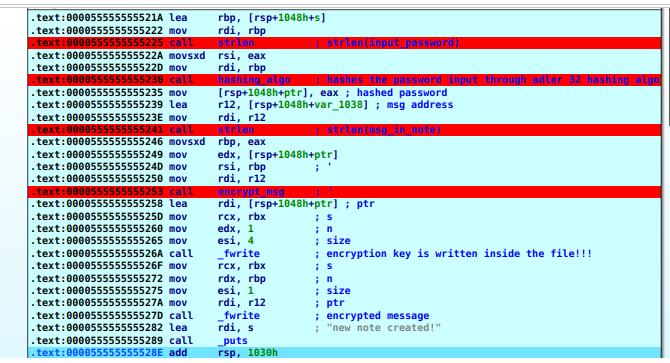
The Encryption Loop - Rolling XOR
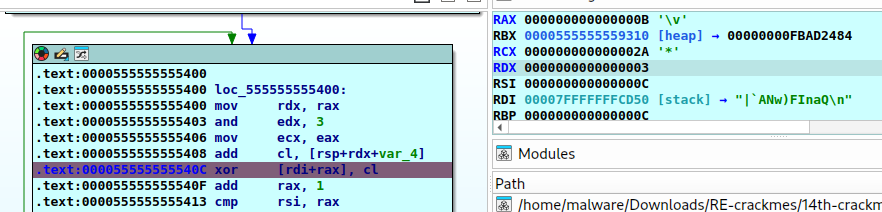
The encryption loop iterates over every character of the message. On each iteration:
mov   rdx, rax            ; rax = loop counter i
and   edx, 3              ; rdx = i % 4  (key index, wraps 0->1->2->3->0...)
mov   ecx, eax            ; ecx = i
add   cl, [rsp+rdx+var_4] ; cl  = i + key_array[i % 4]
xor   [rdi+rax], cl       ; encrypt: msg[i] ^= cl
The AND 3 instruction is a compiler trick for fast modulo-4. Because 3 in binary is 0b11, ANDing against it zeroes out every bit except the bottom two, which can only ever be 0, 1, 2, or 3. The result cycles endlessly through the four key bytes without ever stepping outside the array - a built-in bounds check that prevents a buffer over-read.
The add cl, [rsp+rdx+var_4] line does two things at once. [rsp+rdx+var_4] is pointer arithmetic: rsp+var_4 is the base address of the key array, and rdx (the key index) slides the pointer forward by 0, 1, 2, or 3 bytes to select the correct key byte. That key byte is then added to ecx, which holds the current loop counter i. The result - key_byte + i - is the actual encryption value applied to the character.
This is what makes it a Rolling XOR cipher. The key changes for every single character, even when the same key byte cycles back around. msg[4] and msg[0] both use key_array[0], but the encryption values are key_array[0] + 4 and key_array[0] + 0 respectively. Identical plaintext characters at different positions in the file produce different ciphertext bytes. The encrypted result overwrites the original character in-place.
After encryption, two fwrite calls write the note to disk. fwrite takes four arguments: fwrite(data_pointer, size_of_one_item, number_of_items, file_handle). The file handle is a pointer to an open FILE structure in memory, returned by fopen and held in rbx throughout the function - it contains a pointer to the memory address assigned to the open file.
- First
fwrite- writes the 4-byte key array (n=1,size=4). - Second
fwrite- writes the encrypted message byte by byte (size=1,n=message_length).
The Key is stored inside the file!!!

The key is hidden and not visible when you read the file normally, you need a hex editor to see the key bytes. Opening the test note in radare2 with px 32 reveals the raw bytes:
0x00000000 1404 2b1f 7c60 414e 7729 4649 6e61 5120 ..+.|`ANw)FInaQ
The very first four bytes - 14 04 2b 1f - are the Adler-32 hash of the password, written into the file header. The remaining bytes are the encrypted message.
Decryption
Hashes are mathematically irreversible, therefore the note_viewer program is useless to us right now, since it will require password input. So, i have to come up with my own script to decrypt the flag using the key alone.
This decryptor mirrors the exact assembly loop translated in Python:
with open('flag.note', 'rb') as f:
    key_array = list(f.read(4))
    encrypted_msg = list(f.read())

print(f'key bytes: {key_array}')

decrypted_msg = ''

for i in range(len(encrypted_msg)):
    key_index = i % 4
    rolling_key = key_array[key_index] + i
    decrypted_byte = encrypted_msg[i] ^ (rolling_key % 256)
    decrypted_msg += chr(decrypted_byte)

print(f'decrypted msg: {decrypted_msg}')
f.read(4) moves the file cursor past the 4-byte header that gets the key. The subsequent f.read() with no argument reads from where the cursor left off, straight to the end of the file, so the key bytes never bleed into the message buffer.
% 256 keeps the rolling key inside a single byte, mirroring what the cl register does in hardware. cl is 8 bits and physically wraps to zero at 256. Without % 256, Python's unbounded integers would produce a different XOR operand and the decryption would produce garbage.
Running against the test note:
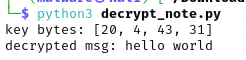
The key bytes [20, 4, 43, 31] are the decimal representation of 0x14, 0x04, 0x2B, 0x1F - exactly what was visible in the radare2 hex dump. The message decrypts correctly.
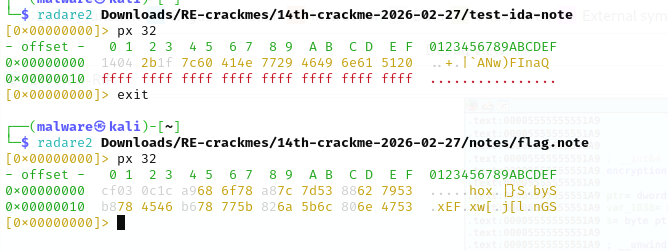
The hex dump of flag.note shows cf 03 0c 1c as the opening four bytes - the key.

From the image above the key bytes in hex are: 0xCF, 0x03, 0x0C, 0x1C. Running the same decryptor script against flag.note gives us the decrypted message. The flag is recovered. No password required.